
When an ERP no longer fits the business, the cost does not stay in IT. It shows up in delayed decisions, workarounds, weak visibility, avoidable labor, and leadership time wasted managing around the system. That is why ERP friction becomes an executive problem long before anyone approves a replacement.
Signs your ERP is now an executive problem
Is this happening in your business?
Growth is being constrained by manual workarounds and reporting delays
Margin is being eroded by rework, poor data, and avoidable admin effort
Leaders lack timely visibility into costs, inventory, delivery, or performance
Teams rely on spreadsheets, side systems, and tribal knowledge to keep work moving
Acquisitions are harder to integrate because processes and data are inconsistent
ERP decisions keep getting delayed because the replacement risk feels too high
Why ERP replacement decisions so often go wrong
Companies do not usually fail because they lack ERP demos. They fail because the decision starts on the wrong footing.
They begin without a solid requirements foundation
They let vendors shape the evaluation around polished demos
They focus on features instead of operational fit
They underestimate the long-term cost of customization and workarounds
They discover critical gaps too late, when the decision is already in motion
You do not have to choose between speed and rigor
Replacing an aging ERP is hard enough. You should not have to choose between moving quickly and making a sound decision. The right structure helps leadership move faster with fewer surprises, less rework, and a lower risk of choosing software the business cannot live with.
1. See the risks before they become expensive mistakes
See where each ERP option creates operational risk
Replacing an aging ERP is risky, time-consuming, and easy to get wrong. A summary view of products sorted by score helps you compare competing products to your business needs so you can spot stronger fits, rule out weaker options, and focus your team’s time on options more likely to support your goals.
Why “requirements met” scores can be misleading
It is not enough to know that an ERP can meet your needs. You also need to know whether it does so through standard functionality, configuration, add-ons, or customization.
A summary analysis helps you identify where implementation risk, added cost, and ongoing complexity may be building, so you can avoid solutions that look acceptable on paper but create problems later.
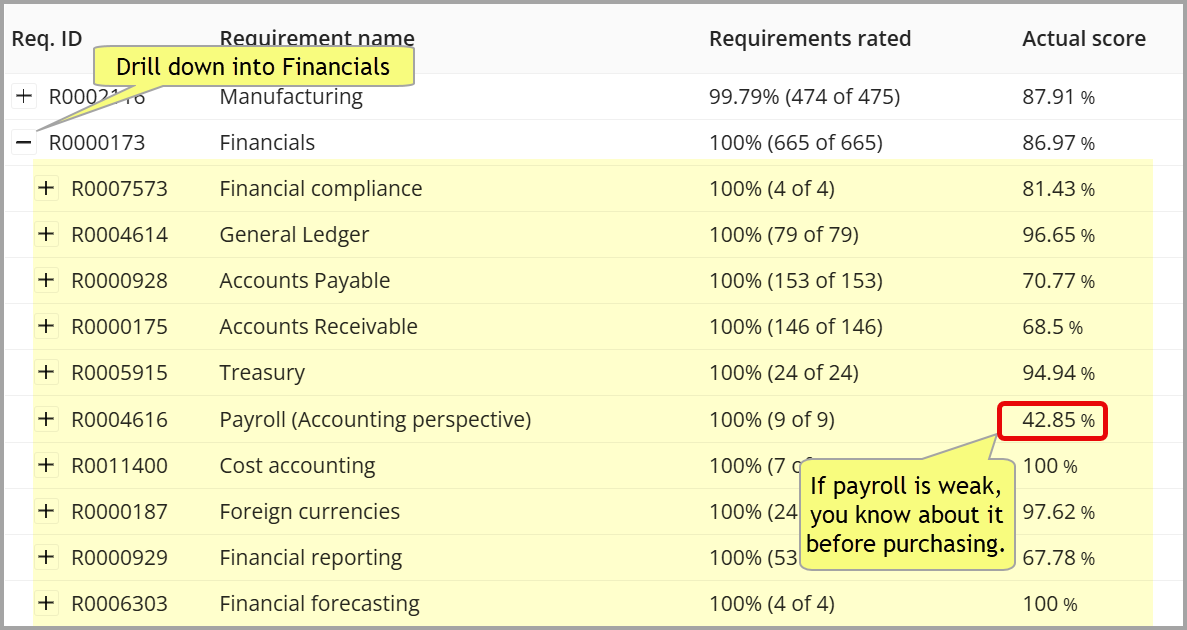
Surface the weak spots before they become costly
An overall ERP score can hide serious gaps in the areas that matter most.
This view helps you spot where a product is strong, uncover where it falls short, and identify risks early, especially in critical areas like payroll, financial reporting, or manufacturing, where weaknesses can lead to workarounds, delays, added cost, and frustration long after the contract is signed.
2. Ensure the right requirements are driving your decision
Get to the details that can make or break an ERP decision
ERP decisions often go wrong when important requirements are too broad and critical details are discovered too late.
This view helps you drill from high-level business areas into the specific requirements underneath them, so your team can uncover hidden gaps before they lead to manual work, reporting issues, costly workarounds, or implementation surprises.
Instead of relying on broad feature claims, you can test whether a product supports the details your business actually depends on.
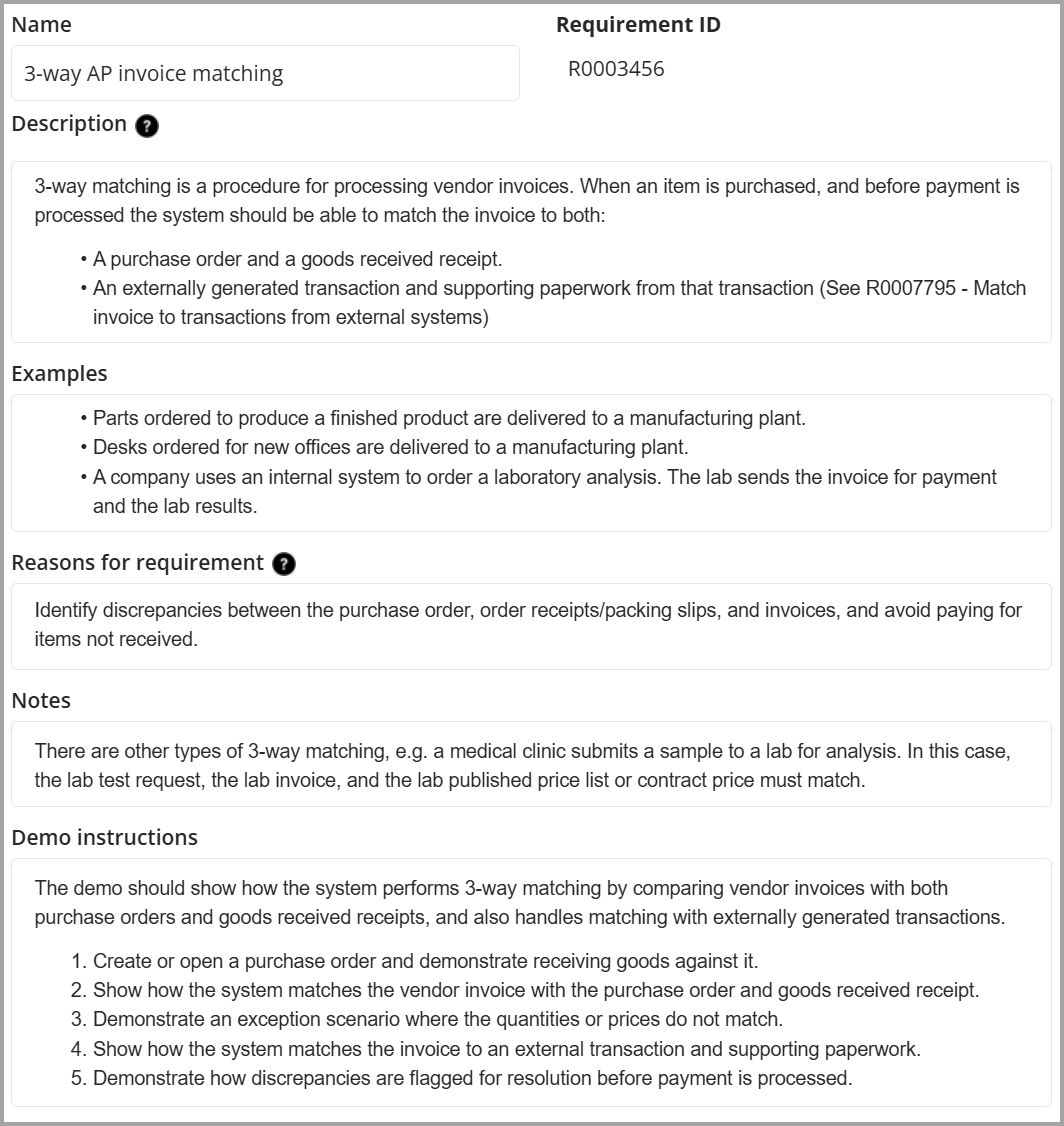
Reduce ambiguity before it becomes cost and conflict
“A vendor can’t be held responsible for software failing to meet requirements that were never clearly defined.”
ERP projects often go wrong because requirements seem clear at first but leave too much room for interpretation. What looks obvious to one team, vendor, or stakeholder can mean something else to another.
Each requirement is defined in practical detail so your team can see what the software must do, why it matters, and, if it will be demoed, what the demo should show. That makes it easier to test real fit instead of relying on broad claims, vague promises, or assumptions.
The result is less misunderstanding early on, fewer disputes later, and a lower risk of choosing software that seems to meet the requirement but falls short in practice.
Focus on the requirements that matter most
Not every ERP requirement carries the same business risk. Some are essential to your company's operations. Others matter less or can wait.
This summary helps your team separate critical requirements from lower-priority ones, so you can focus time, attention, and vendor evaluation where they matter most.
That leads to a sharper evaluation, fewer distractions, and a lower risk of choosing software that looks good overall but falls short in the areas your business depends on most.
3. Turn requirements into better vendor demos

Stop wasting demo time on the wrong things
Most software demos spend too much time on polished features that look good but do little to prove real fit.
The demo script keeps the conversation focused on your highest-priority requirements, so vendors spend less time on generic capabilities and more time demonstrating how their software addresses the areas causing the most operational pain.
That leads to a more useful demo, faster elimination of weak-fit options, and a lower risk of choosing software that impresses in a presentation but falls short in practice.
Next steps
If your ERP is creating friction, limiting growth, or making too many important processes harder than they should be, schedule an executive ERP discussion.
We will talk through the goals your current system may be blocking, the pain it is creating, and what you need from a replacement decision to move forward with more confidence.