Where ERP requirements create value
From defining what the business needs to testing the system and governing it after go-live.
After 16 years of working on ERP replacements, I have found that one weakness undermines projects more consistently than almost any other: inadequate business requirements.
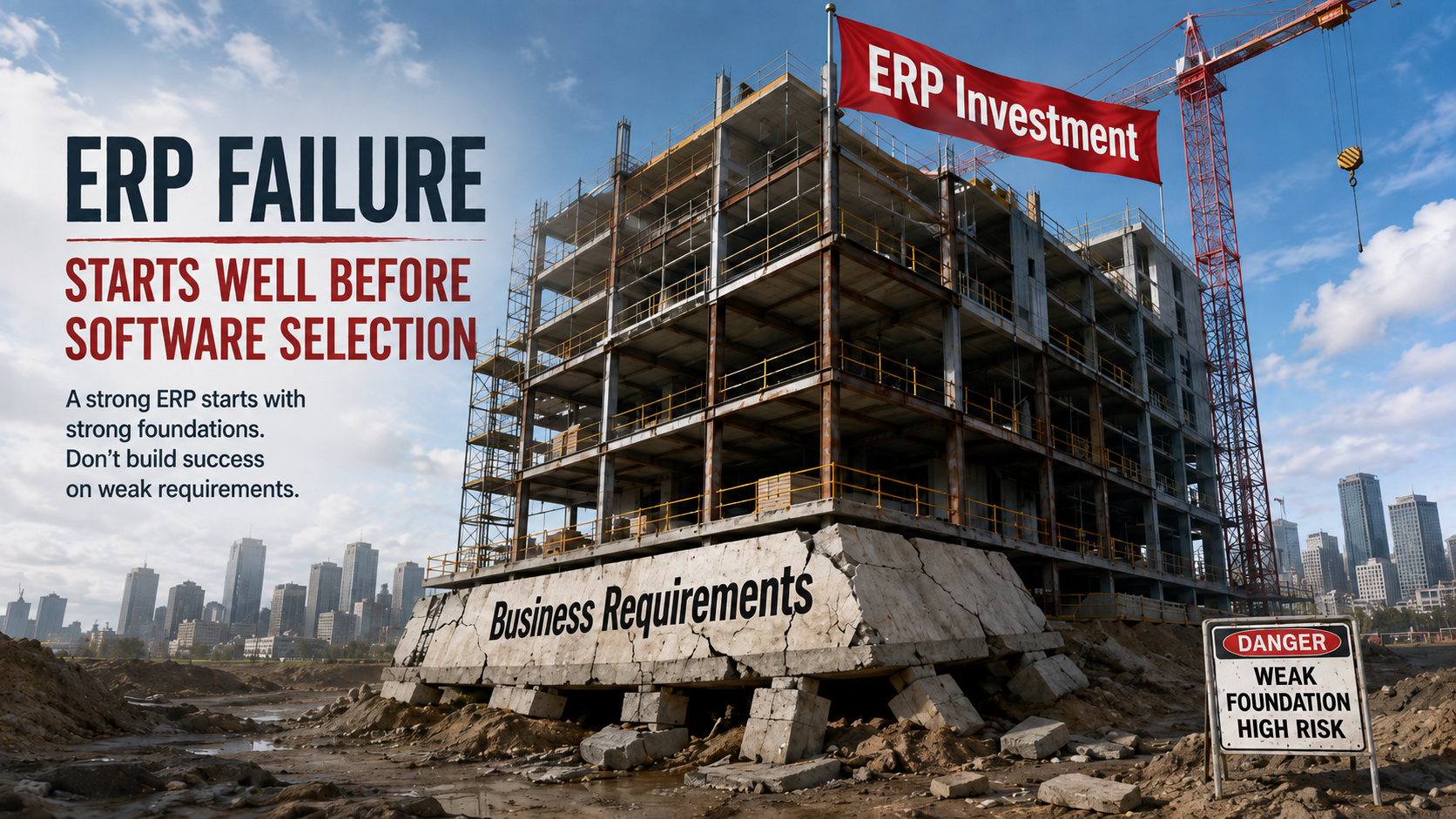
A weak foundation significantly increases project risk.
Every software requirement should trace back to a business need, process, obligation, control, or risk. Define what the business needs before specifying how the selected ERP will deliver it.
Adequate business requirements define WHAT the new software must enable the business to accomplish. Developing them is one of the most time-consuming and expensive parts of software selection, but treating that work merely as a selection cost misses most of its value.
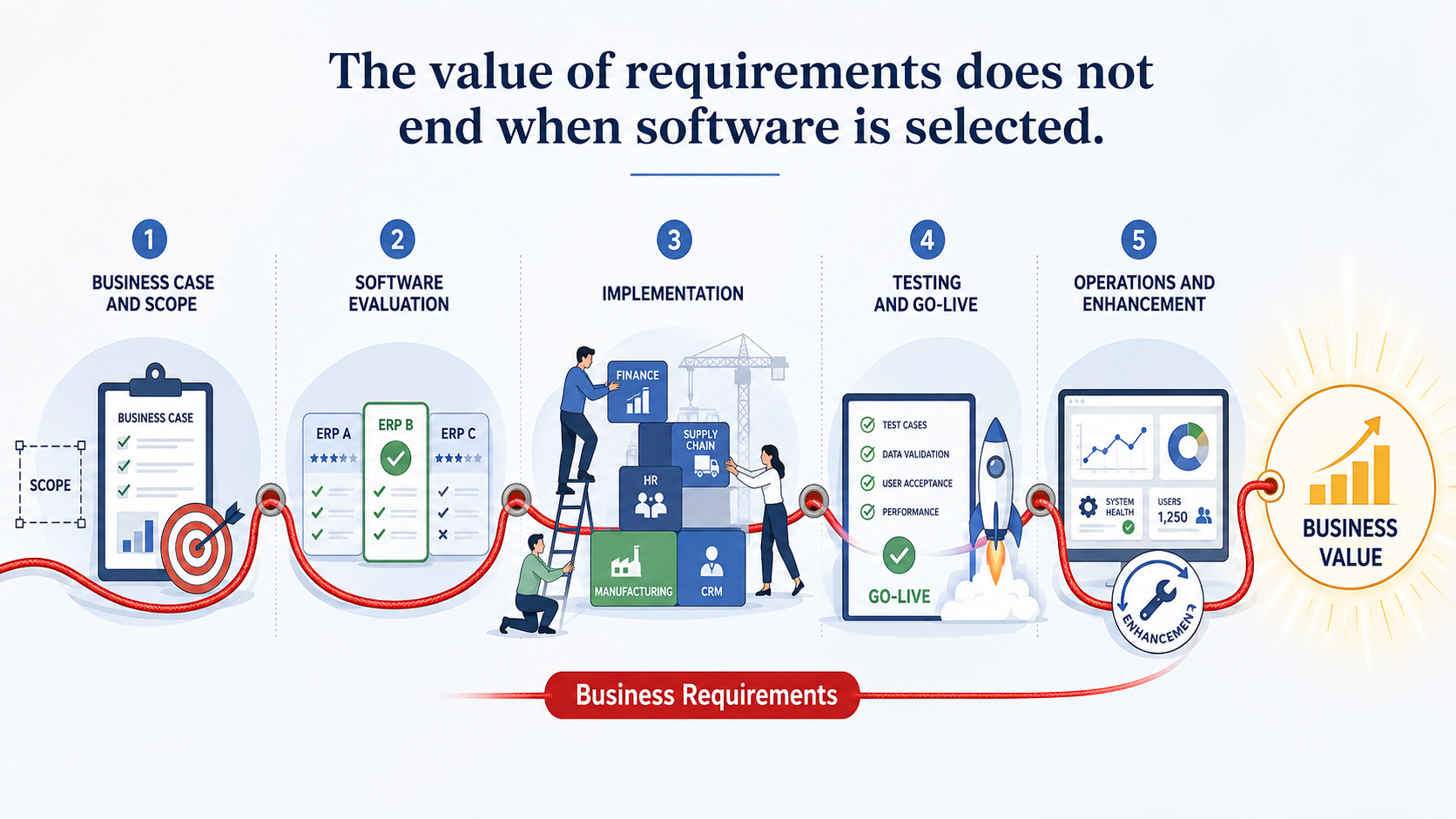
The same requirements are reused throughout the entire ERP replacement lifecycle: to define scope, evaluate products, negotiate contracts, guide implementation, support testing, make the go-live decision, and govern the system after deployment.
Well-defined requirements help you compare ERP products, establish contractual and implementation scope, test what is delivered, make an informed go-live decision, and manage future changes. The 31 uses below show where that value appears.
Before selection
1. Set initial business expectations. Requirements convert broad business objectives into specific capabilities and outcomes. They define what the new ERP must accomplish and provide the basis for determining whether the project ultimately succeeds.
2. Support the business case. Strategic objectives, business goals, and high-level capability needs help identify what the current ERP is holding back and whether replacement is justified. Detailed, prioritized requirements are developed later to guide evaluation and selection.
3. Establish ERP scope and functional boundaries. Requirements define which capabilities should be included in the new ERP and identify those that are excluded or deferred.
4. Prioritize requirements. Capture who needs each requirement, why it matters, and whether it is essential, desirable, or deferrable. This directs limited time, money, and implementation capacity toward the capabilities that matter most. Assign process owners, subject-matter experts, and stakeholders to requirements so ownership and decision authority remain clear throughout the project.
5. Create the software demonstration script. When employees are prioritizing requirements, ask them what they want to see in the demo, and flag it. This creates the draft demo script, which is later refined.
6. Create user buy-in. Requirements preserve user input, priorities, business concerns, and expected outcomes. When users see that their needs directly influence the software decision and implementation scope, they are more likely to support the project and take ownership of the result. They actively want it to succeed.
7. Provide full traceability. Requirements connect business processes and expected outputs to ERP capabilities, evaluation evidence, design decisions, implementation activities, tests, and accepted gaps. This traceability supports project governance, auditability, accountability, and regulatory compliance.
During software evaluation and contracting
8. Better RFP responses. Whether you use an AI Fit Assessment or vendor RFP responses, properly written requirements reduce the risk of the ERP being misrepresented, providing a stronger basis for evaluating product claims and supporting evidence.
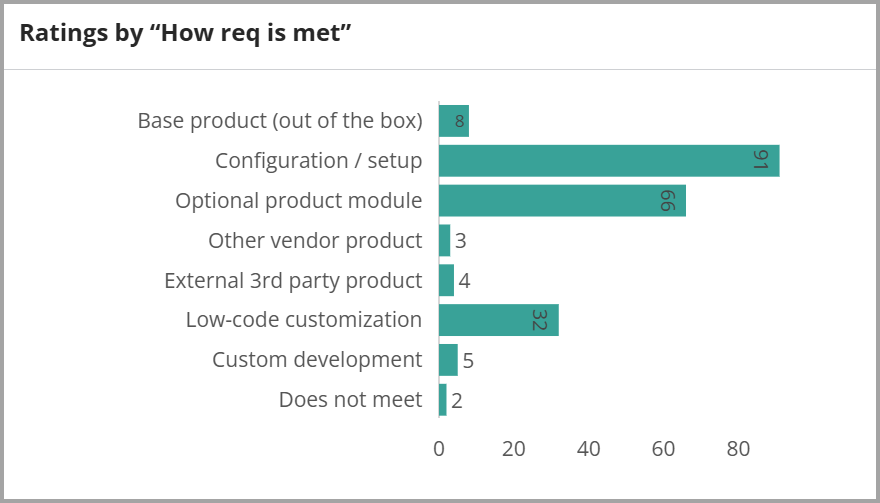
Analysis of HOW an ERP product meets prioritized requirements.
9. Determine how requirements will be met and evaluate the consequences. Requirements identify whether each capability will be delivered through standard functionality, configuration, an optional module, custom code, an integration, or a third-party product. The delivery method is then evaluated for its effects on cost, implementation effort, maintainability, supportability, and upgrade risk.
10. Select ERP products for demonstration. Requirements and fit assessments identify which products should advance to demonstrations. They help eliminate products with unacceptable gaps and concentrate attention on the strongest candidates.
11. Estimate total cost of ownership. Requirements identify ERP components and implementation work needed to satisfy the business. They affect licensing, optional modules, implementation services, custom development, integrations, testing, maintenance, support, and future upgrades.
12. Confirm gaps and select the least consequential compromise. Fit assessments and demonstration findings identify the capabilities each finalist meets, partially meets, or does not meet. The resulting gap record reveals each candidate’s limitations, implementation work, costs, and risks, providing a consistent basis for selecting the product whose overall compromise is least consequential.
13. Negotiate and establish enforceable contractual deliverables. Comparative fit results give the company credible alternatives when negotiating price, terms, scope, and contractual protections with the preferred vendor. Critical requirements are then translated into defined vendor and system-integrator deliverables, responsibilities, acceptance criteria, and statements of work. If a committed capability is not delivered, the requirement, vendor representation, demonstration evidence, and acceptance criteria provide the basis for requiring correction or pursuing another contractual remedy.
14. Establish the selected-ERP baseline. The original requirements are combined with evaluation findings, demonstrations, accepted gaps, and contractual commitments to establish precisely what the selected ERP is expected to deliver.
During implementation
15. Prepare the implementation and reduce rediscovery. Requirements provide the system integrator with the business needs, priorities, process context, ownership, pain points, expected outputs, product findings, and accepted gaps identified during selection. The team can establish implementation workstreams, activities, dependencies, responsibilities, and scope without repeating substantial discovery.
16. Reduce implementation risks. No software is perfect. Weak areas of the selected ERP are identified and addressed early, reducing the likelihood that they will delay implementation later.
17. Guide solution design and verify coverage. Requirements define the business outcomes that configurations, workflows, reports, integrations, controls, extensions, and procedures must deliver. Proposed designs are evaluated against those outcomes, while the requirements provide a checklist for identifying missing, incomplete, or incorrectly configured capabilities before testing begins.
18. Accelerate decisions and resolve implementation disagreements. Requirements preserve the source, owner, rationale, priority, and business context associated with each capability. When implementation questions or disagreements arise, this information identifies the appropriate decision-maker and provides an agreed reference point for evaluating proposed designs, configurations, integrations, and workarounds. This is particularly valuable in larger organizations, where decision authority and business knowledge are distributed.
19. Control scope change. A detailed requirements baseline makes proposed additions or reinterpretations visible so their cost, value, timing, and implementation impact can be evaluated before approval.
20. Support change management and training. Requirements reveal how the ERP replacement will change roles, responsibilities, approvals, controls, processes, and ways of working. They identify the capabilities users must understand and the business situations they must be able to perform, providing the basis for communications, stakeholder engagement, role-specific training, revised procedures, and management support.
During testing and deployment
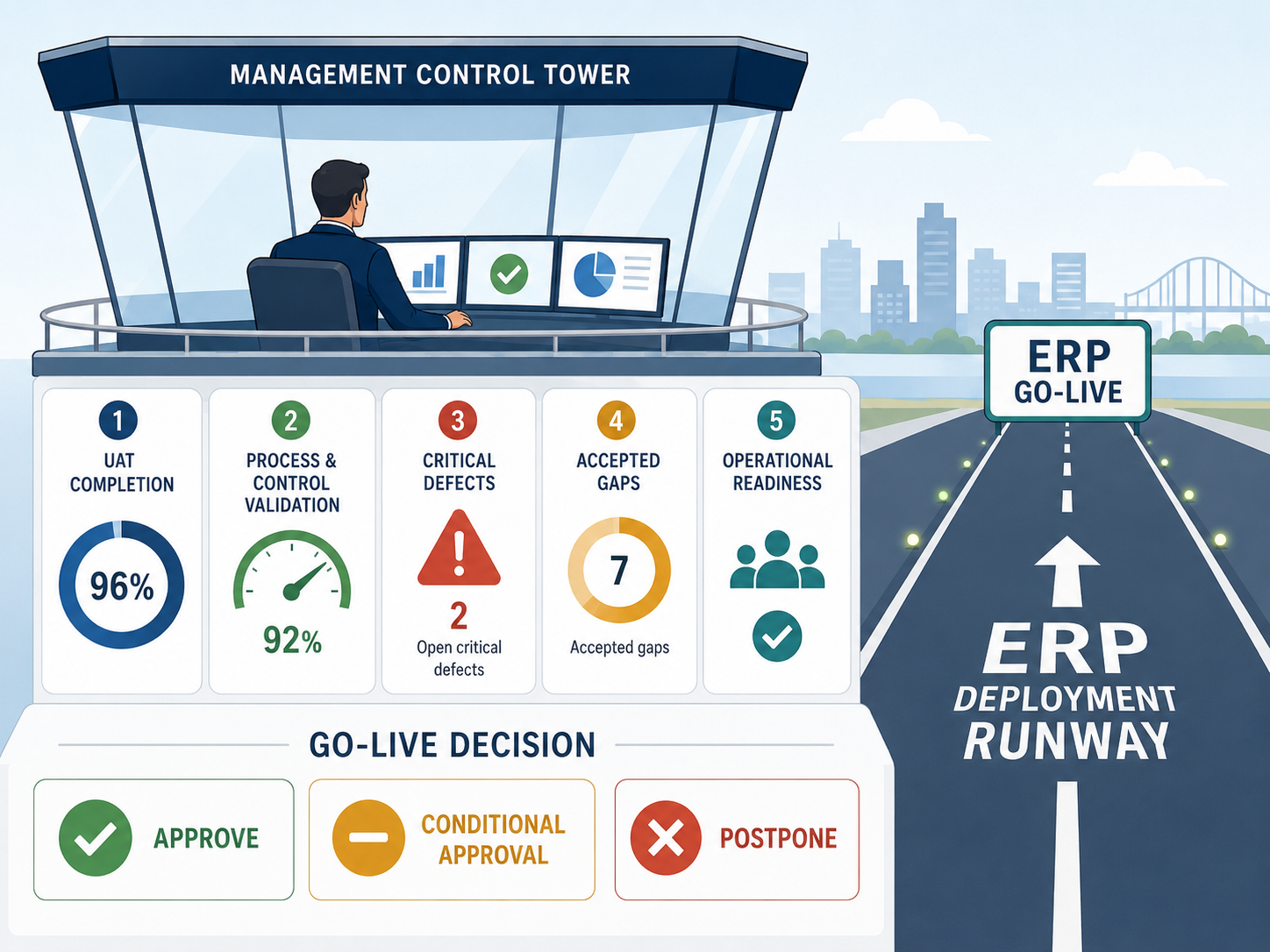
Going live is a lot more than User Acceptance Testing
21. Minimize business disruption risk. User Acceptance Tests based on detailed requirements show whether the system performs the agreed business functions. Their results contribute to the go-live decision alongside data, integration, training, cutover, and support readiness.
22. Validate complete business processes, controls, and compliance. Parent and leaf requirements connect individual capabilities to the complete business processes they support. They are used to validate normal activities, exceptions, handoffs, integrations, data, approvals, outputs, access controls, audit trails, segregation of duties, authority limits, and regulatory requirements. The resulting evidence supports business acceptance, auditability, and compliance.
23. Prioritize defects. Requirement priorities identify which defects threaten critical, compliance, foundational, showstopper, or major pain-point capabilities. This provides a business basis for defect severity and resolution priority.
24. Document requirement coverage and accepted exceptions. Requirements provide a record of which capabilities have passed, failed, been deferred, been accepted with conditions, or remain untested. For in-scope requirements that are not fully satisfied, record the gap, impact, workaround, risk, owner, approval, and planned resolution. This gives management a clear view of what the solution can and cannot do before deployment.
25. Define operational readiness and support the go-live decision. Requirements identify the configurations, data, integrations, reports, controls, procedures, users, and support capabilities that must be prepared and verified before deployment. Requirement coverage, test results, unresolved defects, accepted gaps, workarounds, and associated business risks then provide management with the evidence needed to approve, conditionally approve, or postpone go-live.
After go-live
26. Support operational troubleshooting. Requirements help determine whether a problem results from a software defect, incorrect configuration, failed integration, bad data, incomplete implementation, inadequate training, an accepted gap, or a new business need.
27. Maintain security, controls, and compliance. Requirements continue to support access reviews, control testing, audits, regulatory changes, and remediation. They help identify which processes, configurations, and tests are affected when controls change.
28. Measure whether expected benefits were achieved. Requirements connect the original business needs to the capabilities delivered by the ERP. They are used to determine whether the expected operational, financial, strategic, service, and control benefits were realized.
29. Govern deferred scope and future enhancements. Requirements intentionally excluded from the initial release remain available with their original context, priority, ownership, and rationale. Future enhancement requests are compared with this requirements record to determine whether they represent deferred scope, an unmet requirement, a changed business need, a correction, or a genuinely new capability. This provides a disciplined basis for prioritizing future changes to the ERP.
30. Support regression testing. Requirements and their associated tests are reused after upgrades, patches, configuration changes, integrations, and enhancements. They help confirm that existing business capabilities continue to operate correctly.
31. Preserve institutional knowledge for future evaluations. The requirements database preserves what the business needed, why it mattered, who requested it, how important it was, how the selected product met it, which compromises were accepted, and how each capability was implemented and tested. This reusable corporate asset provides a starting point for evaluating new modules, adjacent systems, replacement products, and future ERP platforms after the original project participants and consultants have left.
Requirements are much more than a selection deliverable
That changes the economics of requirements work. The effort is not justified only by a better software decision. It creates value throughout the entire ERP replacement lifecycle.
How many of these 31 uses would your current requirements support? If your requirements disappear after software selection, your company is capturing only a fraction of their potential value.
Ready to evaluate ERP products against what your business actually needs? See how Wayferry develops and uses requirements throughout the project.